


QR Code
Burger Cooking Idle Fast Food

Burger Cooking Idle Fast Food – Build Your Burger Empire

by Arcadian Lab Inc.
(0 Reviews) January 13, 2026
Burger Cooking Idle Fast Food Burger Cooking Idle Fast Food Burger Cooking Idle Fast Food Burger Cooking Idle Fast Food

Latest Version

Update
January 13, 2026
Developer
Arcadian Lab Inc.
Categories
management
Platforms
iOS
Views
0
Visit Page

More About :game

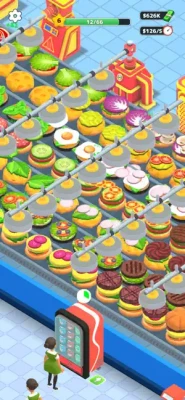
Burger Cooking Idle Fast Food is a casual restaurant management and idle cooking game where you build and automate a growing burger business. Start with simple burgers, improve your kitchen production line, unlock stations, upgrade equipment, and serve customers through drive-thru, dine-in, and scooter delivery services. The game combines fast-food cooking with idle tycoon mechanics, allowing your restaurant to continue earning money even while you are away.

Burger Cooking Idle Fast Food puts you in charge of a busy hamburger restaurant. Instead of simply preparing individual meals, the game focuses on managing the entire production process.

You begin with basic burger preparation and gradually improve your restaurant by upgrading cooking and packing stations, speeding up conveyor belts, increasing delivery capacity, and unlocking additional burger options.

The main objective is simple: produce more burgers, serve more customers, earn more money, and turn a small fast-food operation into a larger automated restaurant business.

Gameplay Overview

The gameplay revolves around three connected activities: cooking, automation, and restaurant expansion.

You prepare burger ingredients such as patties and buns, assemble meals, and send completed orders toward customers. As your business grows, you can improve the machines responsible for production and packing.

The idle system is particularly important because the restaurant can continue operating while you are offline. Returning to the game gives you another opportunity to collect earnings and reinvest them into your kitchen.

Build a Burger Production Line

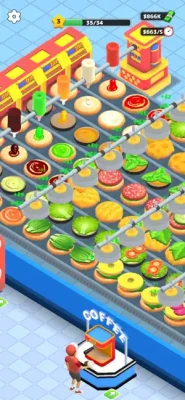
Your kitchen works like a miniature food factory. Production becomes increasingly automated as you improve different stations and equipment.

The more efficiently your kitchen operates, the easier it becomes to keep up with customer demand.

Cook and Assemble Burgers

The restaurant starts with basic burger preparation before allowing you to expand your operation. Fresh patties, toasted buns, and different ingredient combinations form the foundation of the cooking system.

Upgrade Your Kitchen

Money earned from selling food can be invested back into the restaurant. Upgrades can improve production speed, packing efficiency, conveyor movement, and delivery capacity.

Restaurant Management

Burger Cooking Idle Fast Food is less about manually cooking every burger and more about learning how to manage a growing production system.

A successful restaurant depends on balancing:

  • Cooking speed
  • Production capacity
  • Packing efficiency
  • Customer demand
  • Delivery capacity
  • Machine upgrades
  • Idle earnings

This gives the game a light management layer on top of its cooking theme.

Customer Service and Delivery

One of the game's distinguishing features is that burgers are not limited to a single restaurant counter.

Drive-Thru

Drive-thru service focuses on quick customer pickups. Increasing your production speed helps you serve more customers without allowing the ordering process to become a bottleneck.

Scooter Delivery

Scooter delivery expands the restaurant's reach beyond the immediate counter. Improving delivery capacity can help increase the number of orders your business handles.

Dine-In Restaurant

The dine-in area provides another way to serve customers and contributes to the overall restaurant-management experience.

These three customer channels create a broader fast-food business simulation rather than a simple burger-cooking game.

Main Features

  • Idle restaurant management
  • Burger cooking and assembly
  • Automated production lines
  • Kitchen station upgrades
  • Conveyor belt improvements
  • Packing-machine upgrades
  • Multiple customer delivery options
  • Drive-thru service
  • Scooter delivery
  • Dine-in restaurant
  • Burger customization
  • Different burger recipes
  • Offline earnings
  • Restaurant expansion
  • Fast-food tycoon progression
  • Strategic resource management

How to Play

  1. Start your burger restaurant.
  2. Produce basic burgers and serve customers.
  3. Earn money from completed orders.
  4. Upgrade important kitchen stations.
  5. Improve machines and conveyor speeds.
  6. Increase packing and delivery capacity.
  7. Unlock additional burger options as you progress.
  8. Use idle earnings to continue upgrading the restaurant.
  9. Expand your operation and improve overall efficiency.

The most important principle is to reinvest your restaurant earnings into improvements that increase your production capacity.

Controls and Interface

The game is designed around simple touch controls suitable for mobile play.

Most interactions involve tapping stations, upgrades, and management options rather than complicated character movement or traditional action-game controls.

This makes Burger Cooking Idle Fast Food accessible to players who enjoy management games without wanting a complex control scheme.

Beginner's Guide

1. Upgrade Production First

Early upgrades that improve burger production can have a significant effect because faster production means more opportunities to generate revenue.

2. Watch for Bottlenecks

If burgers are being produced faster than they can be packed or delivered, upgrading the cooking station alone will not solve the problem.

Think of your restaurant as a chain where every stage needs to keep pace.

3. Improve Conveyor Efficiency

Faster movement through the production line can help reduce delays between preparation and delivery.

4. Increase Delivery Capacity

Once the kitchen becomes efficient, delivery can become the next important area to improve.

5. Use Idle Earnings Wisely

Because the restaurant continues operating while offline, return regularly and put accumulated earnings toward upgrades rather than allowing your progress to stagnate.

Advanced Strategy

Experienced players should think about overall production efficiency rather than upgrading everything equally.

For example, if your burger production is already fast but packing is slow, increasing cooking speed may provide less benefit than improving the packing system.

A useful upgrade priority is:

Production → Packing → Conveyor Speed → Delivery Capacity

However, the best choice depends on where your restaurant currently has its biggest bottleneck.

Progression System

Progression is based primarily on improving the restaurant's production capabilities.

As you advance, you can:

  • Upgrade machines
  • Improve production speed
  • Increase packing efficiency
  • Expand delivery capacity
  • Unlock new burger options
  • Improve automation
  • Increase restaurant earnings

The long-term loop is straightforward: earn → upgrade → produce faster → serve more → earn more.

Burger Recipes and Customization

Burger Cooking Idle Fast Food includes different burger combinations and fast-food customization. The game's description emphasizes experimenting with ingredient combinations while expanding the restaurant operation.

This gives the cooking side of the game some variety while the management systems provide the longer-term progression.

Game Modes and Activities

The game does not present a large selection of traditional competitive game modes. Instead, its activities are centered around the restaurant-management loop:

  • Burger production
  • Kitchen automation
  • Customer service
  • Drive-thru orders
  • Scooter deliveries
  • Dine-in service
  • Machine upgrades
  • Restaurant expansion
  • Idle income collection

Idle and Offline Gameplay

One of the most important mechanics is offline progression.

The restaurant can continue running when you are not actively playing, allowing you to return later and continue developing your business.

This makes the game suitable for players who enjoy idle tycoon games and prefer short sessions rather than constantly managing a restaurant in real time.

Difficulty

The basic controls are easy to understand, so the game has a low barrier to entry.

The more interesting challenge comes from deciding where to spend your earnings. Players who simply upgrade randomly may progress less efficiently than players who identify production bottlenecks and prioritize useful improvements.

Visual Style and Atmosphere

Burger Cooking Idle Fast Food uses a colorful, casual presentation designed around fast-food restaurants, burger production, cooking stations, delivery services, and automated machinery.

Its overall atmosphere is lighthearted and approachable rather than realistic or simulation-heavy.

Ads and In-App Purchases

The App Store listing shows that the game is free to download but includes in-app purchases. Listed purchases include options such as removing advertisements, a Delivery Boy, Helper, Flying Reward, Helicopter, Cleaner, and other advertising-related offers. Prices shown on the current listing include purchases ranging from $2.99 to $7.99 for several options.

Player reviews also frequently mention advertisements as one of their major complaints, so players looking for an uninterrupted experience should be aware of the game's monetization approach.

Age Rating

Burger Cooking Idle Fast Food is rated 4+ on the U.S. App Store.

Single Player and Offline Play

The store listing describes the restaurant as continuing to operate while the player is offline. This is an important part of its idle design.

The game is primarily built around managing your own restaurant rather than competitive multiplayer gameplay.

Technical Details

DetailInformation
GameBurger Cooking Idle Fast Food
CategorySimulation
DeveloperARCADIAN LAB INC.
PriceFree
In-App PurchasesYes
Age Rating4+
Size335.2 MB
LanguagesEnglish + 7 more
iPhoneiOS 15.6 or later
iPadiPadOS 15.6 or later
MacmacOS 12.5+ with Apple M1 or later
Apple VisionvisionOS 1.0+
PlatformsiPhone, iPad, compatible Mac, Apple Vision

These specifications are based on the current App Store listing.

Player Reception

The current U.S. App Store listing shows 1.8 out of 5 from 22 ratings, so the public rating is currently quite low.

Some reviews like the basic restaurant concept, while others criticize the amount of advertising, limited content, progression issues, and reported bugs. One reviewer also reported problems with earnings calculations after upgrades. These are player-reported experiences rather than independently verified technical findings.

Pros and Cons

Pros

  • Easy-to-understand restaurant management
  • Fun burger-production theme
  • Idle income system
  • Multiple customer service options
  • Drive-thru, dine-in, and scooter delivery
  • Automation and upgrade mechanics
  • Simple mobile controls
  • Suitable for casual play

Cons

  • Advertising is a major complaint among reviewers
  • Limited content has been reported by some players
  • Some users report progression or money-calculation bugs
  • Monetization can become noticeable
  • The current App Store rating is low

Player feedback indicates that the underlying concept has potential, but the current experience may need additional polish and content.

What Makes Burger Cooking Idle Fast Food Different?

Many cooking games focus primarily on preparing individual dishes under time pressure. Burger Cooking Idle Fast Food instead combines cooking with idle factory-style automation and restaurant management.

The production line, machine upgrades, delivery services, and offline earnings make the game feel closer to a small fast-food tycoon than a traditional cooking challenge.

Comparison With Other Restaurant Games

FeatureBurger Cooking Idle Fast FoodTraditional Cooking Game
Burger preparationYesOften
Restaurant managementStrong focusVaries
Idle earningsYesUsually limited
Production automationYesLess common
Drive-thruYesVaries
Scooter deliveryYesRare
Dine-in serviceYesCommon
Machine upgradesYesVaries
Offline progressionYesOften limited

Who Should Play?

Burger Cooking Idle Fast Food is a good match for players who enjoy:

  • Idle tycoon games
  • Restaurant management games
  • Burger cooking games
  • Food-themed simulators
  • Automation games
  • Casual management games
  • Incremental progression
  • Short mobile gaming sessions

It may be less appealing to players who expect a large restaurant simulation with numerous locations, deep customization, or extensive long-term content.

Expert Rating

Gameplay: 6.5/10
Management: 7/10
Controls: 8/10
Progression: 6/10
Visual Appeal: 7/10
Replay Value: 5.5/10
Overall: 6.3/10

The core restaurant-management idea is enjoyable and accessible, particularly for fans of idle games. However, the current player feedback surrounding advertisements, bugs, and limited content prevents it from reaching the level of the strongest restaurant tycoon games.

Latest Update Information

The App Store currently lists version 25.11.19, released on November 20, 2025, with a minor update. Earlier version-history entries include minor updates released on November 18 and November 12, 2025.

Privacy Information

According to the developer's App Store disclosure, the app may use location information, identifiers, and usage data for tracking. Data not linked to the user's identity may also be used for advertising, analytics, and diagnostics. Apple notes that these privacy disclosures are provided by the developer and have not been verified by Apple.

Frequently Asked Questions

Is Burger Cooking Idle Fast Food free?

Yes. The game is free to download, but the App Store listing includes optional in-app purchases.

What type of game is Burger Cooking Idle Fast Food?

It is a casual restaurant-management and idle simulation game focused on cooking burgers, automating production, serving customers, and expanding a fast-food business.

Can the restaurant earn money while I am offline?

Yes. Offline restaurant operation is one of the game's advertised idle mechanics.

Can I serve customers in different ways?

Yes. The game includes drive-thru service, scooter delivery, and dine-in restaurant service.

Can I upgrade the restaurant?

Yes. You can upgrade machines, improve conveyor belts, increase packing efficiency, and improve delivery capacity.

Does the game have in-app purchases?

Yes. The App Store lists several purchases, including advertisement-removal options and additional helpers and services.

What devices support the game?

The current listing requires iOS 15.6 or later on iPhone and iPadOS 15.6 or later on iPad. Compatible Apple Silicon Macs require macOS 12.5 or later.

What is the age rating?

The game is rated 4+ on the U.S. App Store.

Is Burger Cooking Idle Fast Food suitable for casual players?

Yes. Its simple controls and idle progression make it easy to pick up, especially for players who enjoy relaxed restaurant and tycoon games.

Final Verdict

Burger Cooking Idle Fast Food takes the familiar burger restaurant concept and combines it with idle management, production automation, machine upgrades, and multiple delivery channels.

Its strongest idea is the progression from a simple burger operation into a more automated fast-food business. The ability to keep earning while offline also makes it convenient for players who prefer incremental games.

However, the current player reception highlights important weaknesses, particularly advertising, limited content, and reported bugs.

Overall, Burger Cooking Idle Fast Food is worth considering for fans of casual idle restaurant games who enjoy upgrading production systems and watching a small food business grow.

Rate the Game

Add Comment & Review

User Reviews

Based on 0 reviews
5 Star
0
4 Star
0
3 Star
0
2 Star
0
1 Star
0
Add Comment & Review
We'll never share your email with anyone else.