



Latest Version
August 23, 2026
Headup GmbH
Puzzle
iOS
0
Report a Problem
More About :game
Bridge Constructor Studio is a creative engineering puzzle game built around one satisfying question:
Can you build a bridge strong enough to survive?
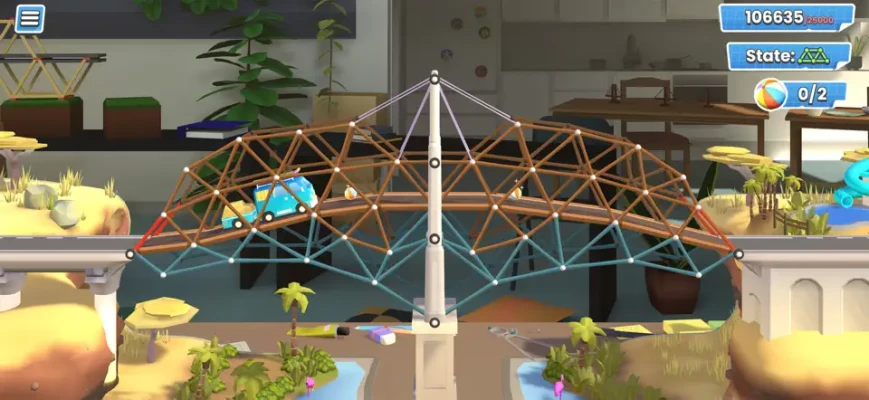
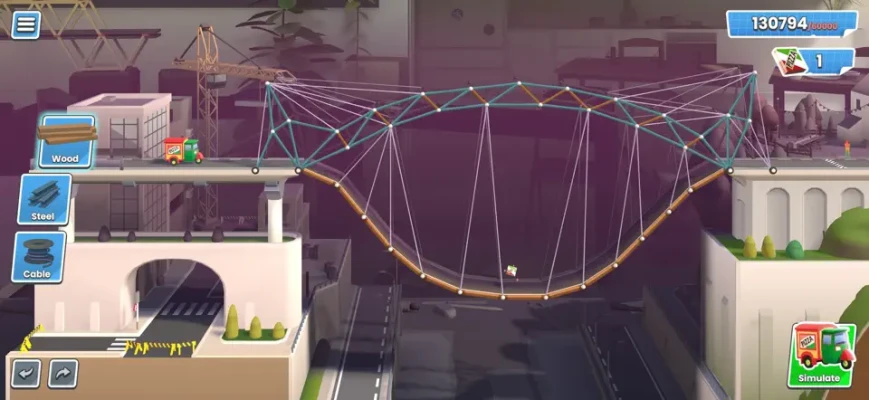
You design bridges inside compact 3D environments, select construction materials, and then activate the simulation to see what happens. Vehicles drive across your creation, and the physics system determines whether your design succeeds or collapses.
The game combines the classic bridge-building formula of the Bridge Constructor series with a modern visual presentation and a more flexible construction system.
Bridge Constructor Studio Gameplay
The gameplay follows a simple but addictive cycle:
Build → Test → Observe → Modify → Test Again
First, you examine the gap or obstacle that needs to be crossed. Then you construct a bridge using the available building elements.
Once your design is complete, start the simulation.
Vehicles will travel across your bridge, putting your construction under physical stress. If the structure survives, you have solved the challenge. If it collapses, you return to the editor, identify the weak point, make changes, and test again.
This trial-and-error approach is at the heart of the experience.
How to Play Bridge Constructor Studio
Getting started is straightforward:
- Choose a puzzle.
- Examine the terrain and distance you need to cross.
- Plan the basic shape of your bridge.
- Select suitable construction materials.
- Connect the bridge sections together.
- Check your structure before starting the simulation.
- Test the bridge with the required vehicle.
- Watch how the structure responds to the load.
- Identify weak points if the bridge fails.
- Adjust the design and test again.
The game is designed to make experimentation part of the fun rather than treating failure as a punishment.
Main Features
70 Bridge-Building Puzzles
Bridge Constructor Studio features 70 challenging puzzles spread across different environments. Each level presents a new construction problem and requires you to think about structure, materials, vehicle weight, and terrain.
Five Diverse Biomes
The puzzles take place across five different environments, including city locations, snowy areas, and green valleys.
The changing surroundings help keep the construction challenges visually varied while introducing different structural situations.
Seven Different Vehicles
Your bridges are tested by seven different vehicles, each bringing its own physical behavior and challenge.
The vehicle lineup includes a monster truck, timber transporter, off-road vehicle, pizza delivery van, parcel service truck, vacation van, and city bus.
Multiple Construction Materials
You can build using several materials, including:
- Wood
- Steel
- Cables
- Concrete pillars
- Roadways
Each material gives you another way to approach a structural problem.
No Strict Budget Restrictions
One of the game's biggest creative features is the ability to experiment without a mandatory construction budget.
You can build freely and concentrate on finding a structure that works.
For players looking for an additional challenge, optional budget objectives reward more efficient designs.
Animated 3D Mini-Dioramas
Each bridge is presented inside an animated 3D environment.
This compact presentation allows you to clearly see the construction, surrounding terrain, vehicles, and physics simulation.
Optional Challenges
After solving a bridge puzzle, you can go beyond simply getting the structure to work.
Optional challenges encourage you to create more efficient or particularly clever constructions while keeping the bridge stable.
Bridge Construction System
The construction system is the core of the game.
You aren't simply placing decorative objects. Every structural decision can affect the final result.
A bridge that looks strong may collapse under the weight of a heavy vehicle. A seemingly simple design can sometimes be more effective than an unnecessarily complicated structure.
This makes every successful bridge feel like an engineering solution rather than simply completing a checklist.
Physics-Based Gameplay
Physics plays a central role in Bridge Constructor Studio.
Once the simulation begins, vehicles put your bridge under load. Poorly supported structures can bend, break, or collapse.
This creates the game's most satisfying moment: watching your carefully designed bridge survive the test.
It also makes failure useful. When something breaks, you can see where the structure needs improvement and use that information in your next attempt.
Materials Explained
Wood
Wood is a versatile material that can be useful for basic structural support and early designs.
Steel
Steel provides a stronger construction option for structures that need to handle heavier loads.
Cables
Cables can help distribute forces and provide additional structural support.
Concrete Pillars
Concrete pillars can provide vertical support where the terrain and level design allow them.
Roadways
Roadways create the actual surface vehicles travel across and are essential for making a functional bridge.
The combination of these materials gives players multiple ways to solve the same construction problem.
Vehicles and Their Challenges
Different vehicles create different bridge-building problems.
Monster Truck
The monster truck allows you to create more adventurous structures, including ramps and loops for stunt-oriented challenges.
Timber Transporter
The heavy timber transporter demands a sturdier bridge and tests how well your construction handles heavier loads.
Off-Road Vehicle
The off-road vehicle introduces moving objects and environmental obstacles that can make certain bridge designs more complicated.
Pizza Delivery Van
The pizza delivery van adds a lighter vehicle challenge while contributing to the game's playful atmosphere.
Parcel Service Truck
The parcel truck provides another practical vehicle type for testing your constructions.
Vacation Van
The vacation van brings another vehicle with its own physical characteristics.
City Bus
The city bus creates a heavier transport challenge and requires you to consider the strength and stability of your design.
Bridge Building Strategy
A successful bridge isn't necessarily the largest or most complicated one.
The best approach is usually to understand the problem first.
Look at the distance you need to cross, identify where support can be placed, and think about which material makes sense for each section.
Then build a simple version and test it.
If it survives, you can refine it. If it fails, the simulation gives you useful information about where your design needs reinforcement.
Beginner Tips
Start Simple
Don't immediately build an elaborate structure.
A simple bridge makes it easier to understand what is causing a failure.
Watch the Simulation
The test isn't just a pass-or-fail screen. Pay attention to where your bridge bends, shifts, or breaks.
Use Support Wisely
Adding support in the right location can be much more effective than adding large amounts of material everywhere.
Test Frequently
There is no reason to wait until you think your bridge is perfect.
Testing early can reveal problems before you spend too much time refining a flawed design.
Experiment
Because the game allows considerable freedom, don't be afraid to try unusual solutions.
Sometimes an unconventional bridge can work better than the obvious approach.
Advanced Bridge-Building Tips
Experienced players can focus on improving both stability and efficiency.
A bridge that simply survives is only the beginning. Optional challenges encourage you to find better solutions and stay within specified budgets.
Try to identify the forces affecting your structure rather than randomly adding supports.
If a bridge consistently fails in one location, reinforce that section instead of rebuilding the entire structure.
You can also compare different designs to discover which materials and support arrangements produce the best results.
Game Progression
Bridge Constructor Studio offers progression through its collection of bridge-building puzzles.
As you complete challenges, you encounter new environments, vehicles, structural situations, and construction requirements.
The lack of a traditional character-level system keeps the focus where it belongs: improving your engineering skills.
Your real progression is learning to build better bridges.
Difficulty
The game is easy to understand but can become increasingly demanding.
The basic construction tools are accessible to newcomers, while the physics simulations create challenges for players who want to optimize their designs.
Optional budget objectives add another layer for experienced builders who want more than simply completing each puzzle.
Graphics and Atmosphere
Bridge Constructor Studio uses a modern, charming visual style built around colorful 3D mini-dioramas.
The environments include urban skyscraper areas, snowy canyons, lush valleys, and other distinct settings.
The presentation is deliberately playful rather than hyper-realistic, which fits the game's accessible approach to engineering puzzles.
Creativity Without Limits
One of the most appealing aspects of Bridge Constructor Studio is the freedom to experiment.
Because the standard construction system does not force you to stay within a strict budget, you can try unusual designs without worrying about wasting resources.
Build a conventional bridge.
Build an unnecessarily massive bridge.
Build a strange bridge that somehow works.
The game encourages experimentation and lets the physics determine the result.
Optional Budget Challenges
Although the game provides freedom during construction, players who want greater difficulty can pursue optional budget objectives.
These challenges encourage you to build a bridge that is not only functional but also economical.
This creates two different ways to approach a puzzle:
Make it work or make it work efficiently.
Player Profiles
Bridge Constructor Studio supports up to five player profiles, each with its own campaign progress.
This makes it easier for family members or friends to play on the same device without overwriting each other's progress.
Game Center and Achievements
The iOS version supports Game Center, including achievements.
This adds another layer of progression for players who enjoy completing challenges and collecting achievements alongside solving the main puzzles.
Player Experience
The current US App Store listing shows a 4.5/5 rating from approximately 1.6K ratings, although ratings can change over time.
Players who enjoy physics puzzles and construction games can find the bridge-building concept highly rewarding because every failure provides information that can be used to improve the next attempt.
At the same time, some reviewers have criticized the minimalist editing interface and the precision demanded by the physics system. That makes the game potentially more challenging for players accustomed to more advanced bridge-building editors.
Pros and Cons
Pros
- 70 bridge-building puzzles
- Physics-based simulation
- Five different environments
- Seven vehicles
- Multiple construction materials
- Creative construction without strict budget limits
- Optional budget challenges
- Practice through repeated testing
- Modern 3D presentation
- Five player profiles
- Game Center achievements
- No advertisements
- Suitable for both beginners and experienced puzzle players
Cons
- The physics can be demanding.
- Some players may find the simplified building interface restrictive.
- The complete game requires a one-time purchase after the free beginning.
- Players looking for action or traditional strategy gameplay may find the experience too focused on construction.
Who Should Play Bridge Constructor Studio?
Bridge Constructor Studio is a strong choice for players who enjoy:
- Bridge-building games
- Engineering games
- Physics puzzle games
- Construction games
- Creative sandbox games
- Logic puzzles
- Simulation games
- Architecture games
- Problem-solving games
- Vehicle physics
- Engineering challenges
Bridge Constructor Studio on iPhone and iPad
Bridge Constructor Studio is available for iPhone and iPad through the App Store.
The listing requires iOS 16.0 or later on iPhone and iPadOS 16.0 or later on iPad. It also supports Mac with macOS 13.0 or later on Apple silicon, as well as Apple Vision.
The game is free to try, with the beginning available before a one-time in-app purchase unlocks the complete experience. The US listing currently shows the full-game unlock at $4.99 and states that there are no ads.
Technical Details
| Detail | Information |
|---|---|
| Game | Bridge Constructor Studio |
| Developer / Seller | Headup GmbH |
| Genre | Puzzle |
| Subgenre | Bridge Building / Physics |
| Platforms | iPhone, iPad, Mac, Apple Vision |
| Puzzles | 70 |
| Environments | 5 biomes |
| Vehicles | 7 |
| Construction Materials | Wood, steel, cables, concrete pillars, roadways |
| Business Model | Free to try + one-time full-game purchase |
| Full Game Price | $4.99 on the current US listing |
| Advertisements | No ads |
| Age Rating | 4+ |
| Size | 448.8 MB |
| Languages | English + 12 additional languages |
| Game Center | Yes |
| Achievements | Yes |
| Family Sharing | Yes |
These details are based on the current US App Store listing.
Latest Updates
The App Store version history shows version 1.3 dated August 7, 2025. The update addressed an issue involving the full game not being unlocked while offline.
Previous releases included bug fixes and polishing, as well as fixes related to in-app purchase detection.
Bridge Constructor Series
Bridge Constructor Studio is the latest entry in the Bridge Constructor series and combines ideas from previous games with a modern presentation.
The developer describes it as a return to the roots of classic bridge-building gameplay, with an intuitive construction system, easy controls, unrestricted experimentation, and optional challenges.
Bridge Constructor Studio vs Traditional Building Games
Traditional construction games often focus on city management, resource production, economics, or large-scale infrastructure.
Bridge Constructor Studio takes a much narrower approach.
Every puzzle is about solving a specific engineering problem.
You don't need to manage an entire city or economy. Instead, you concentrate on one bridge, test it, identify weaknesses, and improve it.
That focused design makes the game accessible while still offering substantial room for experimentation.
Is Bridge Constructor Studio Worth Playing?
For fans of bridge-building games, physics puzzles, engineering simulations, and creative construction games, Bridge Constructor Studio is an appealing package.
Its 70 puzzles, five biomes, seven vehicles, and multiple construction materials provide plenty of variety, while unrestricted building lets players experiment without immediately worrying about budgets.
The most satisfying moments come when a carefully designed bridge survives a difficult simulation—or when a spectacular collapse shows exactly what needs to be fixed.
If you enjoy solving problems through experimentation rather than simply following predetermined solutions, this is one of the more distinctive construction puzzle games available on iPhone and iPad.
Frequently Asked Questions
What is Bridge Constructor Studio?
Bridge Constructor Studio is a physics-based puzzle game where players design and test bridges across different environments.
How many puzzles are in Bridge Constructor Studio?
The game includes 70 bridge-building puzzles.
How many vehicles are available?
There are seven different vehicles, each introducing different physics and construction challenges.
What materials can I use?
The game includes wood, steel, cables, concrete pillars, and roadways.
Does Bridge Constructor Studio have a budget?
The standard construction experience does not impose strict material or budget restrictions. Optional challenges can ask you to complete a bridge within a specified budget.
Is Bridge Constructor Studio free?
You can play the beginning for free. A one-time in-app purchase unlocks the full game. The US App Store currently lists the full-game purchase at $4.99 and states that the game has no advertisements.
Does Bridge Constructor Studio have ads?
No. The current App Store description specifically states that the game has no ads.
Can I play Bridge Constructor Studio on iPhone?
Yes. The game is available on iPhone and requires iOS 16.0 or later.
Can I play Bridge Constructor Studio on iPad?
Yes. It is designed for iPad and requires iPadOS 16.0 or later.
Does the game support achievements?
Yes. The App Store lists Game Center support and achievements.
Can multiple people play on the same device?
The game supports up to five player profiles, with each profile maintaining its own campaign progress.
When was Bridge Constructor Studio released on iOS?
The App Store version history shows the initial version, 1.0, dated June 18, 2025.
Final Verdict
Bridge Constructor Studio takes bridge construction and turns it into a polished physics puzzle experience.
The formula is simple but rewarding: design a bridge, start the simulation, watch the vehicles cross, learn from the physics, and improve your structure.
With 70 puzzles, five environments, seven vehicles, five construction materials, optional budget challenges, Game Center achievements, and plenty of creative freedom, there is a lot to experiment with.
Rate the Game
User Reviews















Popular Games



















 Android
 iOS
iOS Windows
 Xbox
Xbox