



Latest Version
August 23, 2026
Headup GmbH
Puzzle
iOS
0
Report a Problem
More About :game
Bridge Constructor Playground is a creative construction puzzle game from Headup GmbH that focuses on the fundamentals of bridge building without overwhelming players with complicated mechanics.
Your task is straightforward: build a bridge that allows vehicles to safely cross a difficult gap.
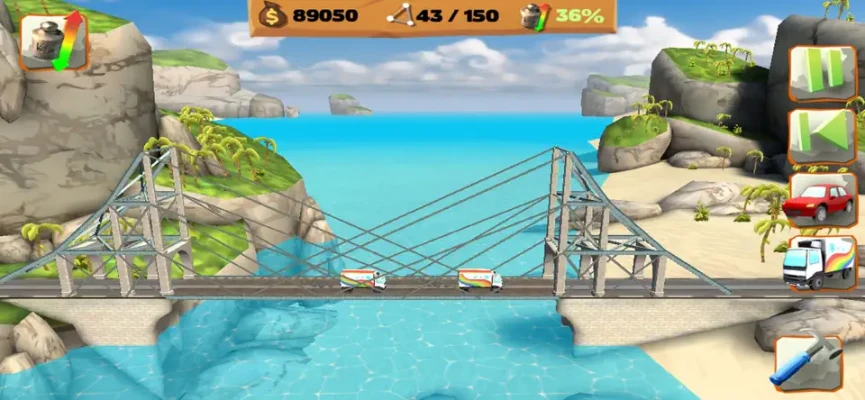
You might need to span a canyon, cross a river, connect two areas in a city, or construct a route through a mountainous landscape. Once the bridge is complete, cars and trucks put your design through a physics-based stress test.
The game is deliberately more approachable than the original Bridge Constructor, with an extensive tutorial and a flexible building system designed to encourage experimentation.
Bridge Constructor Playground Gameplay
The core gameplay is built around a simple but satisfying cycle:
Plan → Build → Test → Observe → Improve
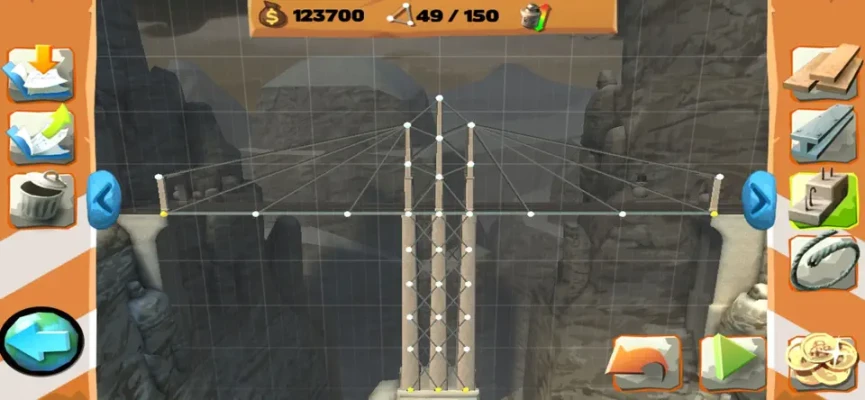
First, study the terrain and determine where your bridge needs to go. Then choose construction materials and connect the required points.
Once the structure is finished, launch the stress test.
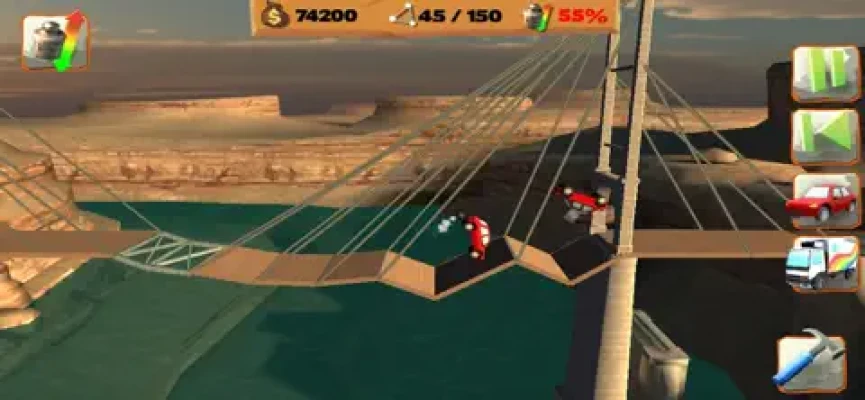
If the vehicle crosses successfully, you've solved the basic challenge. If part of the bridge bends or collapses, you can return to construction mode and strengthen the weak areas.
This trial-and-error system makes failure useful rather than frustrating.
How to Play Bridge Constructor Playground
- Select a level from the world map.
- Examine the gap and surrounding terrain.
- Identify the available connection points.
- Choose your construction materials.
- Build the roadway and supporting structure.
- Start the vehicle test.
- Watch how your bridge reacts to the load.
- Look for areas experiencing excessive stress.
- Modify the structure if necessary.
- Try to earn additional badges and improve your score.
The game allows considerable freedom, so there is rarely only one possible solution.
Main Features
32 Bridge-Building Levels
Bridge Constructor Playground includes 32 levels across its environments. Each stage presents a different construction problem and gives you an opportunity to experiment with bridge design.
The level-based structure makes it easy to play for a few minutes or spend much longer refining a particular bridge.
Five Different Settings
The game features five environments:
- City
- Canyon
- Beach
- Mountains
- Rolling hills
The changing environments provide visual variety while giving the construction challenges different layouts and surroundings.
Four Construction Materials
You can construct your bridges using four main materials:
- Wood
- Steel
- Steel cable
- Concrete piles
Each material provides another way to approach structural problems, allowing players to experiment with different bridge designs.
No Fixed Budget
One of the most appealing aspects of Playground is its flexible construction system.
Unlike bridge-building games that immediately force you to stay below a strict spending limit, Bridge Constructor Playground gives you substantial freedom to build and experiment.
This makes it particularly friendly to beginners who are still learning how different materials behave.
Extensive Tutorial
The game includes an extensive tutorial designed to introduce new players to bridge construction.
This makes Bridge Constructor Playground a good entry point for people who have never played an engineering or physics-based construction puzzle before.
Bridge Stress Testing
The most exciting moment comes after construction.
When a car or truck drives across your bridge, the structure is subjected to physical stress.
The game provides percentage-based and color-coded stress visualization, allowing you to see how heavily different parts of your construction are being loaded.
This turns the stress test into more than a simple pass-or-fail system.
You can actually learn from what happens.
If a section becomes heavily stressed, you know where your design needs attention.
Car and Truck Challenges
Bridge Constructor Playground includes two primary stress levels involving cars and trucks.
A bridge that handles a lighter vehicle may not necessarily be ready for a heavier load.
This creates an important progression in your engineering decisions.
You need to consider not just whether a bridge works, but how much load it can safely handle.
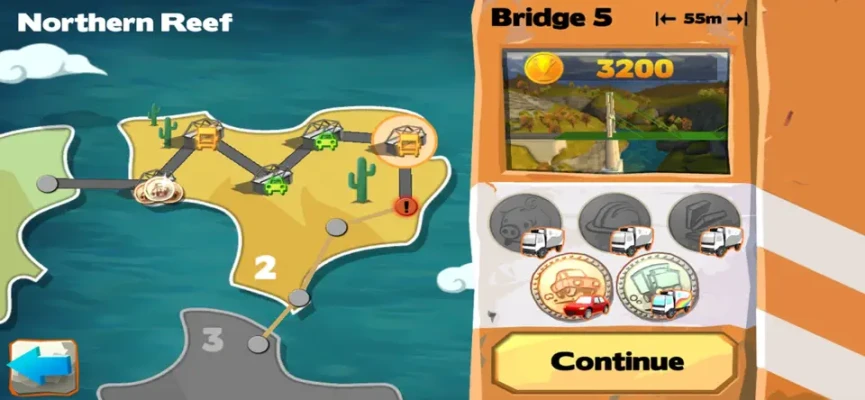
The Badge System
The badge system gives experienced players an additional reason to replay completed levels.
Each bridge has five badges to earn, with different requirements that can challenge you to rethink your construction.
For example, a challenge might require you to keep the bridge below a certain stress limit.
This means completing a level is only the beginning.
You can return later and attempt to build a more efficient, stronger, or more specialized bridge.
Bridge Building Strategy
Successful bridge construction isn't always about adding more materials.
A bridge covered in unnecessary supports can work, but understanding where support is actually needed can produce a cleaner and more effective design.
Start by considering:
- Where the vehicle will travel
- Where the bridge needs support
- Which materials are best suited to each section
- How much weight the structure must carry
- Where stress is likely to concentrate
Then test your idea.
The physics simulation will tell you whether your assumptions were correct.
Understanding Construction Materials
Wood
Wood is a versatile material and is useful for experimenting with basic bridge structures.
It is particularly helpful when learning how different shapes and supports affect stability.
Steel
Steel provides a stronger structural option for demanding sections of a bridge.
It can be useful when a design needs additional strength.
Steel Cable
Steel cables allow you to experiment with different support arrangements and can be particularly useful when creating more sophisticated structures.
Concrete Piles
Concrete piles provide strong support points and can help stabilize sections of a bridge where additional structural support is required.
Stress Visualization
One of the game's most useful educational features is its visual stress system.
Instead of simply telling you that your bridge failed, the game shows how different sections are performing.
Percentages and colors help you identify heavily loaded areas.
For beginners, this provides an intuitive way to understand basic structural concepts without requiring advanced engineering knowledge.
Beginner's Guide
If you're playing Bridge Constructor Playground for the first time, don't try to build the perfect bridge immediately.
Start with a simple structure.
Step 1: Understand the Gap
Look carefully at the distance between the two sides.
Step 2: Create the Roadway
Make sure the vehicle has a continuous path from one side to the other.
Step 3: Add Support
Use structural elements underneath or around the roadway where necessary.
Step 4: Test Early
Don't spend too much time perfecting a design before seeing whether it actually works.
Step 5: Study the Stress
Look at which sections experience the greatest pressure.
Step 6: Improve
Strengthen weak areas rather than rebuilding everything from scratch.
Advanced Bridge-Building Tips
Don't Overbuild
Adding more material isn't automatically the best solution.
Try to understand why a structure is failing before adding additional pieces.
Watch the Stress Percentages
High stress in one area can indicate that the forces aren't being distributed effectively.
Think About the Vehicle
A design that survives a car may struggle under the weight of a truck.
Experiment With Shapes
Different bridge shapes can distribute forces differently.
Try several approaches instead of assuming the first design is the only answer.
Chase Badges After Completion
Once you have a reliable bridge, return to the level and work toward the additional badge objectives.
This can turn a simple puzzle into a much more demanding engineering challenge.
Game Progression
Bridge Constructor Playground uses a straightforward level-based progression system.
As you complete bridges and earn badges, you can unlock further sections of the game.
The survey map provides an overview of unlocked worlds and levels, helping you keep track of your progress.
Your progress isn't simply about finishing stages. Collecting badges and improving your high scores gives you additional goals.
High Scores and Replay Value
Every level has a high-score component.
Once you've successfully completed a bridge, you can return and try to improve your result.
This is especially appealing for players who enjoy optimization puzzles.
Instead of asking only:
"Can I build a bridge that works?"
You can start asking:
"Can I build a better bridge?"
Educational Gameplay
Bridge Constructor Playground has an educational side without feeling like a traditional educational application.
Players naturally learn about:
- Structural support
- Load distribution
- Material properties
- Stress
- Weight
- Stability
- Engineering problem-solving
- Trial and error
The colorful presentation and straightforward controls make these concepts accessible to younger players as well as adults. The developer describes it as an experience suitable for the whole family.
Graphics and Atmosphere
The game uses a bright and friendly visual style rather than attempting to create a highly technical engineering simulator.
Its colorful environments and clear construction interface make it easy to see what you're building and understand the result of each test.
The presentation is one reason the game works well as an introduction to bridge-building mechanics.
Game Center Support
The iOS version supports Game Center leaderboards and achievements, giving competitive players another reason to replay levels and improve their performance.
If you're the type of player who enjoys collecting achievements or comparing scores, these features add another layer of replay value.
Bridge Constructor Playground vs Bridge Constructor
The two games share the same basic bridge-building concept, but Playground is designed to provide a more approachable experience.
Bridge Constructor Playground focuses on:
- Easier entry
- Extensive tutorial
- Creative construction
- Flexible building
- Badge challenges
- Family-friendly presentation
The original Bridge Constructor places more emphasis on traditional bridge engineering and resource constraints.
For beginners, Playground can be an excellent place to learn the fundamentals before moving into more demanding bridge-building games.
Difficulty
Bridge Constructor Playground has an accessible starting point but offers progressively more demanding challenges.
The basic construction mechanics are easy to understand, but earning all the available badges requires considerably more thought.
A player can simply build a functional bridge, while an experienced player can return to optimize the same structure and complete stricter objectives.
That flexible difficulty makes the game suitable for different skill levels.
Player Experience
The current US App Store listing shows 4.2/5 stars from 675 ratings.
The game's reviews highlight its approachable bridge-building concept, while some players particularly enjoy refining structures to complete additional challenges.
One recurring appeal is that the flexible construction system lets players approach the same bridge in different ways.
Pros and Cons
Pros
- Easy-to-learn bridge construction
- Extensive tutorial
- 32 levels
- Five environments
- Four construction materials
- Physics-based stress testing
- Cars and trucks
- Five badge challenges per bridge
- High scores
- Game Center achievements
- Game Center leaderboards
- Creative construction freedom
- Family-friendly presentation
- Educational problem-solving elements
Cons
- Players looking for highly realistic engineering simulation may find it simplified.
- The free version limits access to part of the content; the App Store listing offers a full-version unlock.
- Some advanced challenges can require considerable experimentation.
- The game is focused specifically on bridge construction rather than broader city-building gameplay.
Who Should Play Bridge Constructor Playground?
This game is especially suitable for players who enjoy:
- Bridge-building games
- Engineering games
- Physics puzzle games
- Construction games
- Logic puzzles
- Simulation games
- Educational games
- Creative sandbox gameplay
- Strategy puzzles
- Family-friendly games
- Problem-solving challenges
Bridge Constructor Playground on iPhone and iPad
The current US App Store listing identifies Headup GmbH as the developer and categorizes Bridge Constructor Playground as a Puzzle game.
It is available on iPhone and iPad, with an app size of approximately 81.5 MB. The listing currently shows a 4+ age rating, English plus 12 additional languages, and Game Center support.
The current listing is free with an optional $1.99 full-version unlock.
Technical Details
| Detail | Information |
|---|---|
| Game | Bridge Constructor Playground |
| Developer | Headup GmbH |
| Genre | Puzzle |
| Gameplay | Bridge Construction / Physics |
| Platforms | iPhone, iPad |
| Levels | 32 |
| Settings | 5 |
| Materials | 4 |
| Stress Tests | Cars and trucks |
| Badge Challenges | 5 per bridge |
| Game Center | Yes |
| Leaderboards | Yes |
| Achievements | Yes |
| Price | Free with optional full-version unlock |
| Full Version | $1.99 |
| App Size | 81.5 MB |
| Age Rating | 4+ |
| Languages | English + 12 more |
Information is based primarily on the current US App Store listing.
Latest Version and Updates
The current iOS App Store page lists the game as Bridge Constructor Playground! and continues to offer it as a free download with an optional full-version unlock.
The game's Android listing was updated on June 10, 2026, showing that the title remains available and maintained on that platform. The Google Play description currently highlights its four-island structure, 160 challenges, career system, badge progression, and low battery use.
The iOS and Android listings differ somewhat in how they present the content, so the iOS figures above are based specifically on the requested App Store version.
Is Bridge Constructor Playground Worth Playing?
Yes, especially if you enjoy creative puzzle games.
Bridge Constructor Playground succeeds because it doesn't require you to understand complicated engineering principles before you can start building.
You can experiment, watch your bridge react to the weight of a vehicle, identify the weak points, and try again.
For beginners, it's an approachable introduction to bridge construction. For experienced players, the badge system and high-score challenges provide additional reasons to optimize existing designs.
Its combination of physics, creativity, construction, and problem-solving makes it one of the more accessible bridge-building games available on mobile.
Frequently Asked Questions
What is Bridge Constructor Playground?
Bridge Constructor Playground is a physics-based puzzle game where you design and test bridges across valleys, rivers, canyons, and other environments.
How many levels are in Bridge Constructor Playground?
The current App Store description lists 32 levels.
How many environments are available?
There are five settings: City, Canyon, Beach, Mountains, and Rolling hills.
What materials can I use?
You can build with wood, steel, steel cable, and concrete piles.
Can I test my bridges?
Yes. Bridges are tested by vehicles, with both car and truck stress levels available.
Does Bridge Constructor Playground have achievements?
Yes. The iOS version supports Game Center achievements and leaderboards.
What are badges?
Badges are additional challenges associated with bridges. Each bridge offers five badge objectives, encouraging players to improve or redesign their structures.
Is Bridge Constructor Playground free?
The US App Store currently lists it as free with an optional $1.99 full-version unlock.
Is Bridge Constructor Playground suitable for beginners?
Yes. An extensive tutorial and relatively unrestricted construction system make it particularly accessible to players who are new to bridge-building games.
Is Bridge Constructor Playground educational?
It can be. The game naturally introduces concepts such as structural support, load, stress, and problem-solving through interactive bridge construction.
Can I play Bridge Constructor Playground on iPhone?
Yes. The App Store lists the game for iPhone and iPad.
Final Verdict
Bridge Constructor Playground is a creative and approachable physics puzzle game that makes bridge engineering surprisingly entertaining.
Its combination of 32 levels, five environments, four building materials, car and truck stress tests, badge challenges, high scores, and Game Center achievements provides plenty of opportunities to experiment and improve.
The biggest strength is its freedom. You're not simply following a predetermined solution—you can design your own bridge, watch it withstand or collapse under pressure, learn from the result, and try something better.
Rate the Game
User Reviews















Popular Games



















 Android
 iOS
iOS Windows
 Xbox
Xbox