



QR Code
Airport Game 3D: Fly & Drive

Airport Game 3D: Fly & Drive – Fly Planes and Drive Vehicles

by Arcadian Lab Inc.
(0 Reviews) January 13, 2026
Airport Game 3D: Fly & Drive Airport Game 3D: Fly & Drive Airport Game 3D: Fly & Drive Airport Game 3D: Fly & Drive Airport Game 3D: Fly & Drive

Latest Version

Update
January 13, 2026
Developer
Arcadian Lab Inc.
Categories
Simulation
Platforms
iOS
Views
0
Visit Page

More About :game

Airport Game 3D: Fly & Drive is a casual aviation and airport simulation game where you can pilot different aircraft while also handling important ground operations. Take off, land, taxi across the airport, operate service vehicles and complete a variety of aviation missions. The game combines flight simulator gameplay with airport driving challenges in detailed 3D environments.

Airport Game 3D: Fly & Drive offers more than traditional airplane simulation. Instead of focusing only on flying, the game lets you experience several parts of airport operations.

You can pilot narrow-body aircraft, wide-body airliners and cargo planes, then switch to airport service vehicles to handle tasks around the terminal and runway. Missions introduce different objectives, making each stage feel like a small airport operation rather than simply another flight.

The game is designed to be easy to pick up while still giving players several different activities to master.

Gameplay Overview

The main gameplay revolves around completing airport-related tasks successfully. Depending on the mission, you may need to take control of an aircraft, perform a takeoff, land safely, taxi to a designated position or help prepare an aircraft for its next journey.

Other missions move the action onto the airport ground. You can operate passenger buses, pushback tugs, fuel tankers and APU starters while navigating around the tarmac.

This combination of flying and driving gives Airport Game 3D its distinctive identity.

Flight Simulation

Flying is one of the central parts of the game. Players can work with several types of aircraft and practice the essential stages of a flight.

Takeoffs

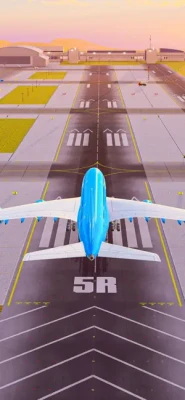
A successful takeoff requires you to control the aircraft as it accelerates along the runway and becomes airborne. Missions progressively encourage you to become more comfortable with aircraft handling.

Landings

Landing is another important challenge. Players must approach the runway, control their aircraft and bring it down safely.

Taxiing

After landing, the aircraft still needs to reach its assigned position. Taxiing adds another layer to the experience and makes the airport environment feel more active.

Airport Ground Operations

One of the game's biggest attractions is its collection of airport service activities.

You can operate:

  • Passenger buses
  • Pushback tugs
  • Fuel tankers
  • APU starters
  • Other airport support vehicles

These activities make the game more than a conventional flight simulator. Instead, it provides a broader look at what happens around an airport before and after a flight.

Aircraft Types

Airport Game 3D includes different aircraft categories, giving players the opportunity to experience various aviation roles.

The game features:

  • Narrow-body jets
  • Wide-body airliners
  • Cargo aircraft
  • Multiple aircraft configurations and liveries

Aircraft customization is also available through different liveries, allowing players to give their virtual fleet a personalized appearance.

Airport Missions and Levels

Each level introduces tasks and objectives that keep the gameplay moving forward. Rather than repeating exactly the same activity, missions can involve different combinations of flying, landing, taxiing and airport ground operations.

This level-based structure makes Airport Game 3D suitable for short gaming sessions because players can focus on completing individual objectives.

3D Airport Environments

The game presents its airports through 3D environments inspired by real-world airport layouts. Runways, aircraft, terminals and ground-service areas create a recognizable aviation setting.

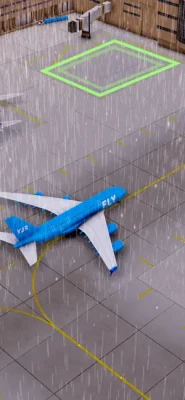
Dynamic weather conditions also add variety to the environments and can change the atmosphere during different flights.

Aircraft Customization

Players can customize their aircraft using different liveries. This feature gives the fleet a more personal appearance and adds an extra reason to explore the available aircraft.

If you enjoy aviation games where visual customization is part of the experience, the livery system provides a simple way to personalize your aircraft.

Controls and Interface

Airport Game 3D is designed around accessible mobile controls. The emphasis is on straightforward interaction so players can quickly move between flying and ground-service activities.

For new players, it is worth spending some time learning how the aircraft responds before attempting more demanding missions.

How to Play Airport Game 3D

  1. Start a mission and read the objective carefully.
  2. Identify whether the task involves an aircraft or ground vehicle.
  3. Follow the airport routes and mission indicators.
  4. When flying, maintain controlled takeoffs and approaches.
  5. Taxi carefully after landing.
  6. Use the correct airport service vehicle when required.
  7. Complete the objective without rushing.
  8. Progress through additional missions and explore different aircraft.

Beginner Tips

Take Your Time During Landings

A controlled landing is usually more important than speed. Approach the runway carefully and avoid making sudden movements.

Learn Taxi Routes

Airport grounds can become confusing when you are unfamiliar with the layout. Pay attention to the designated route and avoid unnecessary turns.

Practice Different Vehicles

Don't focus exclusively on aircraft. Ground vehicles are an important part of the game and mastering them can make airport missions easier.

Watch the Weather

Dynamic weather conditions can change the feel of a mission. Adjust your approach and avoid making unnecessary corrections.

Advanced Tips and Strategies

Experienced players should focus on consistency rather than simply finishing missions quickly.

  • Maintain smoother aircraft movements.
  • Begin preparing for landing early.
  • Avoid excessive steering corrections.
  • Learn the airport layout.
  • Keep an eye on mission objectives.
  • Practice pushback and ground-service tasks.
  • Use different aircraft to become familiar with their handling.
  • Complete missions efficiently rather than taking unnecessary risks.

Game Modes and Activities

Airport Game 3D is built around mission-based aviation and airport activities rather than a traditional competitive multiplayer structure.

Its main gameplay activities include:

  • Aircraft flying
  • Takeoff challenges
  • Landing missions
  • Aircraft taxiing
  • Airport vehicle driving
  • Passenger transportation
  • Aircraft pushback
  • Refueling operations
  • Ground-service tasks
  • Airport exploration
  • Aircraft customization

Game Difficulty

The game is generally approachable for casual players because its core concept is easy to understand. However, completing flight and airport missions smoothly requires practice.

The difficulty comes less from complicated aviation theory and more from learning how to control aircraft and vehicles accurately within the airport environment.

Graphics and Presentation

Airport Game 3D uses 3D airport environments with aircraft, terminals, runways and service vehicles. Dynamic weather helps provide visual variety, while different aircraft liveries allow players to customize their fleet.

The game's presentation is designed more around accessible mobile simulation than strict professional flight realism.

Player Experience

The strongest part of Airport Game 3D is its variety. Players aren't restricted to sitting in the cockpit for every mission. The ability to switch between aircraft and airport service vehicles creates a broader airport experience.

The App Store listing currently shows 4.6 out of 5 from 28K ratings on the U.S. storefront. Player reviews also show differing opinions about advertising and realism, so the experience may vary depending on what you expect from a flight simulator.

Pros and Cons

Pros

  • Combines flight and airport driving gameplay
  • Multiple aircraft types
  • Includes cargo planes and airliners
  • Airport ground-service vehicles
  • Mission-based progression
  • 3D airport environments
  • Dynamic weather
  • Aircraft livery customization
  • Easy-to-understand concept
  • Available on iPhone and iPad

Cons

  • It is designed as a casual mobile simulation rather than a professional flight simulator.
  • Some player reviews criticize advertising frequency.
  • Players looking for highly realistic aircraft physics may find the controls simplified.

The App Store currently lists the game as free with in-app purchases, including a paid option to remove ads.

Technical Details

InformationDetails
GameAirport Game 3D: Fly & Drive
DeveloperARCADIAN LAB INC.
GenreSimulation
PlatformiPhone, iPad
PriceFree with in-app purchases
App Size487.1 MB
Age Rating9+
Required iOSiOS 13.0 or later
Required iPadOSiPadOS 13.0 or later
LanguagesEnglish plus 7 additional languages
In-App PurchasesYes

These specifications are based on the current U.S. App Store listing.

Updates and Improvements

The App Store version history shows ongoing maintenance and gameplay improvements over several years. Recent entries include performance and stability improvements, while earlier updates introduced level improvements, gameplay changes, bug fixes and smoother gameplay.

The latest listed version is 25.3.27, dated March 27, 2025, with optimized performance and stability noted in the release information.

Who Should Play Airport Game 3D?

Airport Game 3D is a good choice for players who enjoy:

  • Flight simulator games
  • Airplane games
  • Airport simulation
  • Aircraft landing challenges
  • Airport driving games
  • Casual simulation games
  • Aviation-themed mobile games
  • 3D vehicle simulation
  • Short mission-based gameplay

It is particularly appealing if you like the idea of experiencing both the cockpit and the airport tarmac instead of playing only a traditional airplane simulator.

Airport Game 3D vs. Traditional Flight Simulators

Traditional flight simulators usually concentrate heavily on aircraft systems, realistic physics, navigation and detailed cockpit procedures.

Airport Game 3D takes a more casual approach. Its appeal comes from combining airplane flying with airport service activities, missions and vehicle driving.

That makes it easier to approach for casual players who want aviation-themed gameplay without committing to a complex professional-style simulator.

Is Airport Game 3D Realistic?

Airport Game 3D is best described as a casual aviation simulation, not a professional flight training simulator.

It includes recognizable aircraft categories, takeoffs, landings, taxiing, airport layouts and ground operations, but the overall experience is designed to be accessible and entertaining on mobile devices.

Is Airport Game 3D Free?

Yes. The game is listed as free on the App Store, with optional in-app purchases. The U.S. App Store currently lists a Remove Ad purchase for $6.99.

Is Airport Game 3D Available for iPhone and iPad?

Yes. The App Store listing supports iPhone and iPad. It requires iOS 13.0 or later on iPhone and iPadOS 13.0 or later on iPad.

Final Verdict

Airport Game 3D: Fly & Drive offers a fun alternative to conventional airplane games by combining aircraft simulation with airport ground operations. You can take off and land aircraft, taxi around the airport, transport passengers, operate service vehicles and complete mission-based objectives.

Its casual design makes it easy to approach, while the combination of flying and driving provides enough variety to keep airport enthusiasts interested. If you are searching for an airport simulator game, airplane game, flight simulator for iPhone, or airport driving game, Airport Game 3D is worth checking out.

Frequently Asked Questions

What is Airport Game 3D: Fly & Drive?

Airport Game 3D: Fly & Drive is a mobile simulation game combining aircraft flying, airport operations and ground-vehicle driving.

Can you fly airplanes in Airport Game 3D?

Yes. Players can control multiple aircraft and complete takeoff, landing and taxiing activities.

Can you drive vehicles at the airport?

Yes. The game includes airport vehicles such as passenger buses, pushback tugs, fuel tankers and APU starters.

Does Airport Game 3D have different airplanes?

Yes. The game includes narrow-body jets, wide-body airliners and cargo aircraft.

Can you customize airplanes?

Yes. Players can customize aircraft with different liveries.

Does the game have weather effects?

Yes. The game features dynamic weather conditions.

Is Airport Game 3D available on iOS?

Yes. It is available for iPhone and iPad through the App Store and requires iOS 13.0 or later.

Is Airport Game 3D suitable for beginners?

Yes. Its casual approach and mission-based structure make it accessible to players who are new to flight and airport simulation games.

Official App Store: Airport Game 3D: Fly & Drive on the App Store

Rate the Game

Add Comment & Review

User Reviews

Based on 0 reviews
5 Star
0
4 Star
0
3 Star
0
2 Star
0
1 Star
0
Add Comment & Review
We'll never share your email with anyone else.