

Latest Version
August 05, 2024
Ketchapp
Arcade
Android
0
com.ketchapp.bubblewars
Report a Problem
More About :game
Draw & Fight 3D takes a simple arcade combat concept and adds a creative twist.
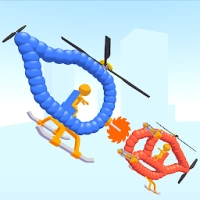
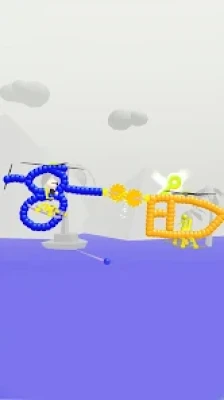
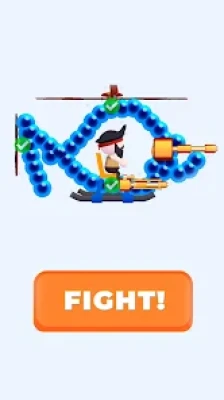
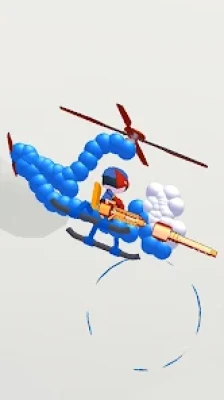
Before entering battle, players can draw their own helicopter. The game then turns that design into a combat vehicle that can be equipped with different weapons.
The official Google Play description highlights an arsenal including guns, machine guns, lasers and more, while emphasizing that players have virtually unlimited possibilities when creating their helicopter.
The goal is straightforward: create a strong helicopter, advance through the levels and defeat increasingly dangerous opponents.
Game Theme and Atmosphere
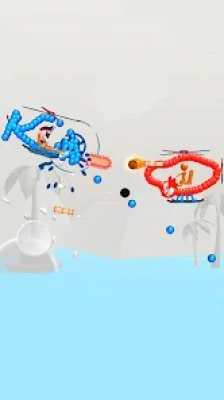
The game combines a playful drawing mechanic with arcade-style aerial combat.
Rather than attempting to simulate realistic helicopter warfare, Draw & Fight 3D focuses on experimentation and quick battles. The creative design system gives players freedom to build unusual helicopter shapes, while the combat stages provide the action.
The result is a lightweight arcade experience built around:
- Creativity
- Customization
- Weapons
- Combat
- Progression
- Experimentation
Gameplay Overview
The central gameplay loop is:
Draw → Equip → Battle → Defeat Enemies → Progress → Improve Your Design
First, create your helicopter. Then select weapons and enter a battle against an opponent.
As you advance through the levels, the enemies become more dangerous, requiring you to think about your helicopter design and weapon selection.
Draw Your Own Helicopter
The game's most distinctive feature is its drawing system.
Instead of giving every player exactly the same helicopter, Draw & Fight 3D lets you create your own design.
The official listing describes the drawing possibilities as essentially unlimited.
This gives players room to experiment with different shapes and designs.
Why the Drawing System Matters
Your helicopter isn't simply a picture on the screen. It becomes part of the game's combat experience.
Players can experiment with:
- Different shapes
- Different proportions
- Unusual designs
- Weapon placement
- Personal visual styles
This creative freedom gives the game an identity beyond ordinary arcade shooters.
Helicopter Customization
Customization is at the heart of Draw & Fight 3D.
You aren't limited to choosing a helicopter from a fixed garage. Instead, the drawing mechanic gives you control over the appearance and structure of your vehicle.
This makes every player's helicopter potentially different.
For players who enjoy building unusual vehicles, the customization system can be one of the most entertaining parts of the game.
Weapon Arsenal
Draw & Fight 3D provides several types of weapons for combat.
The official Google Play listing specifically mentions:
- Guns
- Machine guns
- Lasers
- Other weapons
Different weapons can change the feel of a battle and give players more ways to approach combat.
Guns
Traditional guns provide straightforward offensive power.
They are an accessible starting point for players learning how the combat system works.
Machine Guns
Machine guns bring a faster-fire approach to combat.
They are useful for players who prefer continuous offensive pressure rather than relying on individual attacks.
Lasers
Lasers add another type of weapon to the game's arsenal.
They also help make the weapon system feel more varied than a simple single-gun combat setup.
Battle Dangerous Enemies
The game challenges players to advance through levels and face increasingly dangerous enemies.
This creates a natural progression:
Early battles → Stronger enemies → More difficult encounters → Advanced levels
Players who want to reach further into the game need to adapt their helicopter designs and weapon choices.
Level Progression
Progression is based on advancing through combat levels.
The further you go, the more challenging the enemies become.
This creates a reason to keep experimenting with your helicopter design rather than simply repeating the same battle.
The official description specifically encourages players to advance as far as possible to face the game's most dangerous enemies.
Beginner's Guide
If you're playing Draw & Fight 3D for the first time, start by experimenting.
Step 1: Draw a Helicopter
Create a simple design rather than immediately trying to make something complicated.
Step 2: Choose Your Weapons
Experiment with the available guns, machine guns and lasers.
Step 3: Enter Battle
Test your design against an opponent.
Step 4: Observe the Result
Pay attention to how your helicopter performs.
Step 5: Change Your Design
If the design isn't performing well, try drawing something different.
Step 6: Progress Through Levels
Continue advancing and adapt as enemies become more dangerous.
Advanced Strategy and Tips
Experiment With Shapes
Don't assume that the first helicopter you draw will be your best.
Try different designs and compare how they perform.
Think About Your Weapons
Your helicopter's design is only one part of the battle. Weapon selection is also important.
Don't Overcomplicate Your Design
A complicated-looking helicopter isn't automatically a stronger one.
Focus on creating a design that works effectively in combat.
Learn From Failed Battles
If you lose, use the result as feedback.
Change either your design, weapon selection or approach.
Keep Progressing
The game's challenge increases as you move through the levels, so continually improving your setup is important.
Combat Strategy
Draw & Fight 3D is more about preparation than complicated controls.
Before each battle, consider:
- What type of helicopter should you draw?
- Which weapons should you equip?
- How did your previous design perform?
- What kind of opponent are you facing?
- Can you improve your design before the next battle?
This preparation gives the otherwise simple arcade gameplay an additional strategic layer.
Controls and Interface Guide
The game is designed around a simple touchscreen experience.
Drawing
Use the touchscreen to create your helicopter design.
Combat
The game handles the battle after your custom vehicle enters the arena, with your selected weapons providing the offensive capabilities.
The focus is therefore less on complicated button combinations and more on designing an effective vehicle before combat.
Graphics and Visual Design
Draw & Fight 3D uses a stylized arcade presentation that complements its creative mechanics.
The visual appeal comes partly from seeing your own helicopter design transformed from a drawing into a battle vehicle.
This gives players a satisfying transition:
Your drawing → Your helicopter → Your weapon setup → Your battle
The game's visual simplicity also keeps attention on the custom designs and combat.
Game Difficulty
Overall Difficulty: Easy to Learn, Increasing With Progression
| Category | Difficulty |
|---|---|
| Drawing | Easy |
| Controls | Easy |
| Weapon Selection | Easy–Moderate |
| Early Battles | Easy |
| Later Battles | Moderate |
| Overall Learning Curve | Easy |
The game's basic concept can be understood quickly, while later levels provide greater challenges as stronger enemies appear.
Progression System
Draw & Fight 3D uses level-based progression.
Your journey revolves around:
- Creating helicopters
- Choosing weapons
- Fighting opponents
- Advancing through levels
- Facing stronger enemies
- Experimenting with new designs
Rather than requiring a complicated RPG-style character system, progression is centered around improving your combat approach.
Replay Value
The drawing mechanic gives the game natural replay potential.
Even after creating one successful helicopter, you can experiment with completely different designs.
Players can replay the concept by asking:
Can I create a better helicopter?
Can I defeat the next opponent?
Can another weapon setup perform better?
This experimentation is one of the game's strongest sources of replay value.
Creativity and Customization
For players who enjoy creative mobile games, Draw & Fight 3D offers something different from traditional arcade shooters.
Instead of simply controlling an existing vehicle, you participate in its creation.
That makes the game appealing to players who enjoy:
- Drawing games
- Vehicle customization
- Creative games
- Build-and-battle games
- Arcade combat
- Experimental gameplay
Single-Player Experience
Google Play currently lists Draw & Fight 3D as a game centered around advancing through levels and fighting enemies. The current listing does not present a conventional multiplayer mode as its main gameplay format.
Its core experience is therefore focused on creating your helicopter and progressing through combat encounters.
Family and Age Rating
Google Play currently gives Draw & Fight 3D an Everyone 10+ rating and lists Fantasy Violence and In-Game Purchases in its content information.
Player Experience
The current Google Play listing shows approximately 3.7 stars from more than 3,000 reviews and 1M+ downloads.
Player reactions are mixed.
Some players enjoy the ability to draw their own helicopter and choose weapons, while other reviews mention issues such as advertisements and performance.
This makes the drawing-and-customization mechanic the clearest strength of the game, while the overall experience may vary depending on a player's tolerance for advertising and technical performance.
Ads and In-App Purchases
The Google Play listing currently indicates that Draw & Fight 3D contains ads and offers in-app purchases.
Players should take this into account when deciding whether the game fits their preferred mobile gaming experience.
Features
- Custom helicopter drawing
- Creative vehicle designs
- Multiple weapon types
- Guns
- Machine guns
- Lasers
- Arcade combat
- Level-based progression
- Increasingly dangerous enemies
- Customization-focused gameplay
- Touchscreen controls
- Free-to-play experience
- Fantasy combat
- 1M+ downloads
The core drawing, weapon and progression mechanics are described on the current Google Play listing.
Pros and Cons
Pros
- Unique draw-your-own-helicopter mechanic
- Lots of room for creative designs
- Multiple weapon types
- Simple controls
- Easy to understand
- Arcade-style battles
- Increasing enemy difficulty
- Quick gameplay sessions
- 1M+ Google Play downloads
- Fun concept for creative players
Cons
- Current Google Play rating is below 4 stars
- Ads are included
- In-app purchases are available
- Some players report lag
- Combat may feel repetitive for players seeking deep strategy
- Long-term depth is limited compared with full-scale action games
Player reviews specifically mention lag and advertising concerns, while others praise the drawing and weapon mechanics.
Who Should Play Draw & Fight 3D?
The game is particularly suited to players searching for:
- Drawing games for Android
- Helicopter games
- Custom helicopter games
- Build and battle games
- Arcade games
- Creative games
- Vehicle customization games
- Weapon games
- Casual action games
- Helicopter combat games
- Draw-to-fight games
- Ketchapp games
Draw & Fight 3D vs Traditional Helicopter Games
Traditional helicopter games generally give players a predefined aircraft.
Draw & Fight 3D changes that formula by letting you create the helicopter yourself.
That means the creative process becomes part of the gameplay rather than simply being cosmetic.
Draw & Fight 3D vs Drawing Games
Many drawing games focus purely on artistic creativity.
Draw & Fight 3D adds a combat objective.
Your drawing isn't just something to look at—it becomes a helicopter that enters battle.
This combination makes the game closer to a draw-and-battle arcade game.
Draw & Fight 3D vs Vehicle Customization Games
Traditional vehicle customization games often provide fixed components, menus and upgrade systems.
Draw & Fight 3D takes a more unconventional approach by allowing players to physically draw their own vehicle.
That gives it a more experimental feel.
Latest Update
The current Google Play listing shows March 19, 2024 as the latest update date.
The listing does not currently provide a newer update date than that.
Technical Details
Game: Draw & Fight 3D
Developer: Ketchapp
Developer Organization: UBISOFT MOBILE GAMES
Package ID: com.ketchapp.bubblewars
Platform: Android
Genre: Arcade
Content Rating: Everyone 10+
Downloads: 1M+
Google Play Rating: Approximately 3.7/5
Reviews: 3,000+
Ads: Yes
In-App Purchases: Yes
Latest Listed Update: March 19, 2024
Core Mechanic: Draw a helicopter, equip weapons and fight enemies
Data Safety
Google Play currently says the app may share location, financial information and three additional data types with third parties. It may collect location, personal information and four additional data types. The listing says data is encrypted in transit, while also stating that collected data cannot be deleted.
Privacy disclosures can change, so players should review the current Google Play Data Safety section before installation.
Expert Rating
Overall Rating: 4.0/5
| Category | Rating |
|---|---|
| Creativity | 4.6/5 |
| Helicopter Customization | 4.6/5 |
| Weapon Variety | 4.2/5 |
| Controls | 4.3/5 |
| Arcade Action | 4.0/5 |
| Progression | 3.8/5 |
| Replay Value | 3.9/5 |
| Overall Experience | 4.0/5 |
The game's strongest feature is unquestionably its creative helicopter-building concept.
Verdict
Draw & Fight 3D offers a creative twist on arcade combat by putting the player in charge of designing the helicopter before the fight begins.
The ability to draw your own aircraft and equip it with guns, machine guns, lasers and other weapons gives the game an identity that separates it from conventional helicopter shooters.
Its straightforward controls make it easy to pick up, while increasingly dangerous enemies provide a reason to keep experimenting with your designs.
The current 3.7-star rating and 1M+ downloads show that the game has attracted a substantial Android audience, although player feedback is mixed, particularly around advertisements and performance.
If you enjoy drawing games, helicopter games, creative arcade games or build-and-battle experiences, Draw & Fight 3D is an interesting title to try.
Frequently Asked Questions
What is Draw & Fight 3D?
Draw & Fight 3D is a Ketchapp arcade game where players draw their own helicopter, equip weapons and fight enemies through progressively harder levels.
Can I draw my own helicopter?
Yes. Drawing your own helicopter is the game's main creative mechanic.
What weapons are available?
The Google Play description specifically mentions guns, machine guns, lasers and additional weapons.
Are there different enemies?
Yes. The game requires players to advance through levels and face increasingly dangerous enemies.
Is Draw & Fight 3D free?
The Google Play listing presents the game as free to play, while also indicating that it contains ads and in-app purchases.
Is Draw & Fight 3D suitable for children?
Google Play currently gives the game an Everyone 10+ rating with fantasy violence and in-game purchases.
How many people have downloaded the game?
The current Google Play listing shows 1M+ downloads.
What is the Google Play rating?
The current listing shows approximately 3.7 stars from more than 3,000 reviews.
Does the game have ads?
Yes. Google Play currently identifies ads in the game.
Does Draw & Fight 3D have in-app purchases?
Yes. The Google Play listing currently indicates in-app purchases.
When was Draw & Fight 3D last updated?
Google Play currently lists March 19, 2024 as the update date.
Rate the Game
User Reviews





Popular Games



















 Android
 iOS
iOS Windows
 Xbox
Xbox